Copyright 2021 by Pedja Supurovic, DataVoyage
https://ptz-remote.datavoyage.com/
Simple PTZ Remote Controller configurable for various cameras and other devices. Works with serial port controlled devices.
Download: PTZRemote-1.0.14.zip
Installation: unpack exe from archive in suitable directory. Antivirus would probably initate scan on the first run. Let it finish and restart.
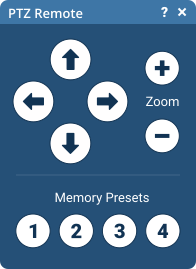
Use cursor buttons to move camera up, down, left and right.
Use zoom buttons (+ and -) to set camera zoom.
Use memory buttons (1, 2, 3, 4) to move camera to preset positions.
Long click on memory button sets current camera position to selected memory.
Advanced configuration options are located in PTZRemote.ini.
Ini file is created on the first run, and set to default configuration (according to PelcoD protocol). You can then edit that file for customizations.
Default configuration:
[Connection]
; Common serial port configuration
ComPort=COM3
ComSpeed=9600
ComDataBits=8

;ComParity values: None, Odd, Even, Mark, Space
ComParity=None
;ComStopBits values: None, One, Two, OnePointFive
ComStopBits=One
;ComHandshake values: None, XonXOff, RequestToSend, RequestToSendXOnXOff
ComHandshake=None

[CommandSettings]
; Command set to use. This is usd as prefix for command sections.
; Allows user to have several sets of commands in single ini and esily change
; which set to use
CommandSet=PelcoD

; Time (miliseconds) user has tokeep mouse clicked on memory button to initiate memory set function
MemorySetClickDelay=1000

; if sound should be anounced when memory set is activated
BeepOnMemorySet=1

[PelcoDMoveCommands]
CommandLeft=ff 01 00 04 20 00 25
CommandRight=ff 01 00 02 20 00 23
CommandUp=ff 01 00 08 00 20 29
CommandDown=ff 01 00 10 00 20 31
CommandStop=ff 01 00 00 00 00 01
CommandInit=ff 00 00 00 00 00 00

[PelcoDZoomCommands]
CommandZoom=ff 01 00 20 00 00 21
CommandUnzoom=ff 01 00 40 00 00 41

[PelcoDPositionCommands]
CommandM1=ff 01 00 07 00 01 09
CommandM2=ff 01 00 07 00 02 0a
CommandM3=ff 01 00 07 00 03 0b
CommandM4=ff 01 00 07 00 04 0c

[PelcoDPositionSetCommands]
CommandSetM1=ff 01 00 03 00 01 05
CommandSetM2=ff 01 00 03 00 02 06
CommandSetM3=ff 01 00 03 00 03 07
CommandSetM4=ff 01 00 03 00 04 08